
ActiveCampaign · AI product vision
A vision for SMS at ActiveCampaign
AI-first was the company direction. Nobody asked me to work out where AI belonged in SMS, so I did. I identified the opportunities, designed the concepts, built the prototype, aligned with my PM and engineering manager, and proposed milestones to the CPO.
- Role
- Sole designer
Self-initiated alongside regular projects - Timeline
- May 2026
Two weeks to build, one week to review with leadership - Partners
- Product manager, engineering manager, engineers, CPO
- Tools
- Figma & Cursor
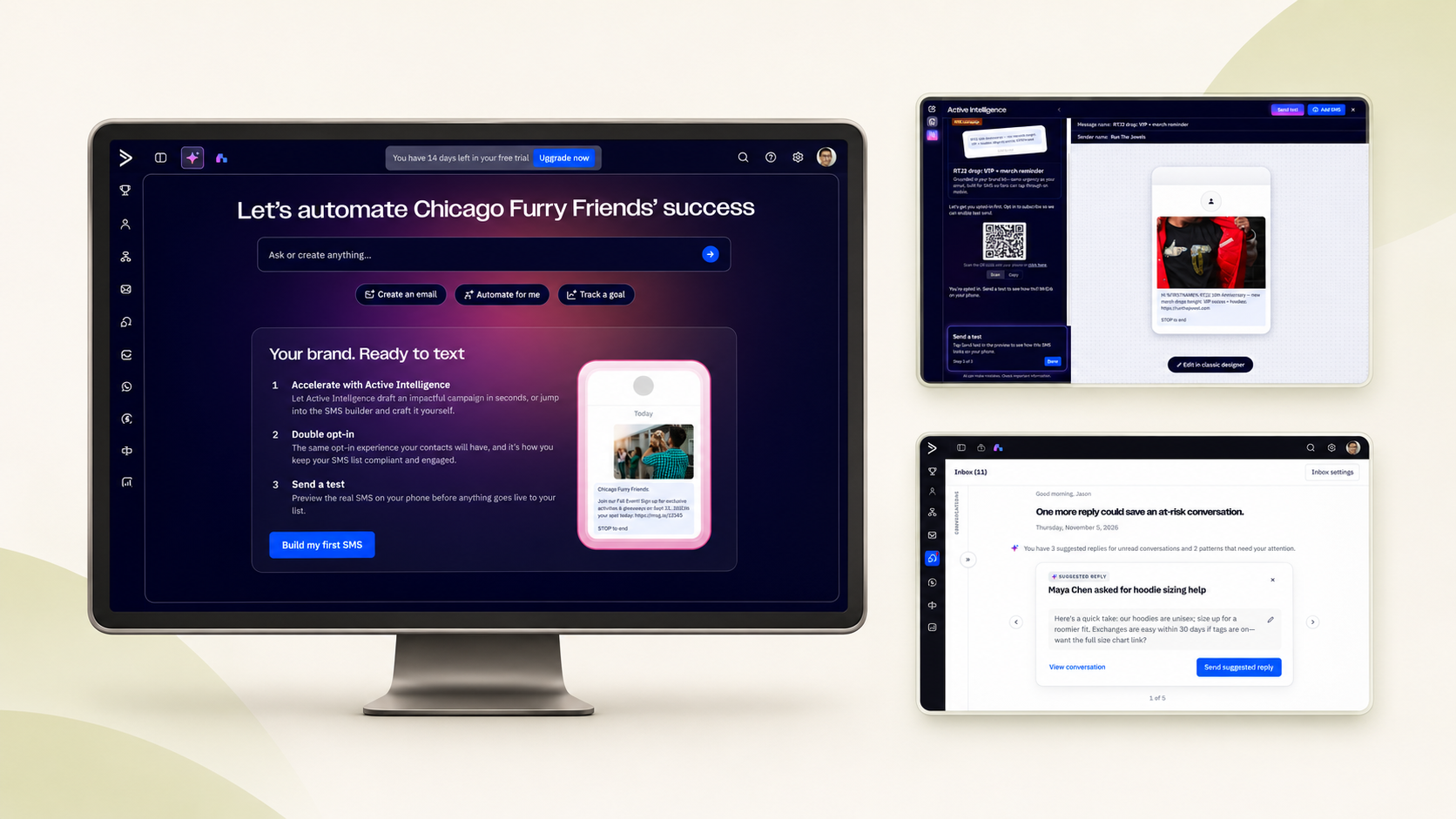
The opportunity
Start where users already work
The company was going AI-first, and SMS had limited visibility as an add-on. I took the vision from zero to one: found where AI helps users most, built the prototype, and pitched the CPO.
Many SMS customers are small businesses or solo operators who do everything themselves, so I looked for moments where guidance could arrive inside the task. I drew from customer insights and lessons from our WhatsApp and CRM teams.
Anticipate the need, keep the user in control.
People across the platform were trying AI features but not sticking with them, which I read as trust not yet earned. Every concept surfaces useful context, prepares an action, and lets the user decide.
- A direction backed by leadership
- The CPO supported the vision and proposed milestones.
- Two workstreams in development
- The SMS trial and inline audience analysis moved forward.
Opportunity 1 · SMS trial
Let people see the value before buying
SMS had a limited conversion rate as an add-on because people couldn’t see it as a product before buying. My hypothesis was that experiencing SMS first would help people understand its value and make them more likely to convert.
The onboarding team had built a guided walkthrough that only showed the email editor. I saw the same pattern could let people without the add-on experience SMS, and adapted it.
One trial, different ways in
- The SMS landing page opens from the SMS icon in the navigation, for anyone curious.
- Trial users focused on SMS see a dashboard card with a drafted campaign.
- Trial users with email who showed interest in SMS see an email insight card.
- Paid customers without SMS see a dashboard card built on their existing email campaigns.
Inside the walkthrough
I first expected the trial to show real delivery data. Engineering and I both wanted that, but it wasn’t technically possible. Together we added a short delay before results appeared, so it felt like a real send instead of instant, too-perfect numbers. The figures are labeled as sample data.
Opportunity 2 · Audience & cost
Two problems at the audience step
Many users aren’t comfortable with segments, so they send to everyone, including people who aren’t engaged. Customers had also long asked for cost visibility, because the same campaign costs different amounts by segment and country.
Two threads, one moment
The audience insight idea began as a hackathon project with two Segment team engineers and wasn’t prioritized there. I saw it fit an SMS problem and brought it over. The cost check was a known pain the SMS PM and I had been working on. Together, they show users who they’re reaching and what it will cost.
- Insights lead with the strongest finding, like how many selected contacts are inactive, and expand for detail.
- With too few credits, users can pick a similar segment or split out only the active contacts.
Why it went first
The hackathon had already produced discovery and engineering groundwork, so Engineering chose it as an early build. We expected cost visibility to help customers understand credit usage, which could lead to more credit purchases.
Opportunity 3 · Proactive inbox
From attention, to action, to less repeat work
SMS conversation volume was still low, but our WhatsApp integration showed the same problems, so I designed for where SMS was heading.
See what needs attention
A briefing points users to conversations that need a reply, borrowing from catch-up summaries in tools like Slack.
Review a prepared reply
A draft is ready to review and send, never sent automatically. It was designed to draw on the knowledge base the team was starting to build.
Reply, automate, or add knowledge
WhatsApp supported automated responses and SMS didn’t, so I designed for that need. Users choose at every step.
Build the vision
A prototype Engineering could build from
The goal was to move from idea to something Engineering could build from without a long handoff.
I built an interactive prototype in Cursor using ActiveCampaign’s design system. Cursor was fast at interactions but kept missing visual details I described in words, like the carousel’s size, how cards stacked and wrapped, and how you moved between them. So I designed those pieces in Figma and brought them in through MCP, stepping in throughout whenever Cursor needed clear design specs.
Cursor handled speed, and Figma stayed the source of truth for visual decisions. A switch for customer states let me walk leadership through what different people would see.
From pitch to development
A vision with a path to delivery
After our company on-site, the business goal was clear across leadership, so I framed the vision around how AI could help an add-on like SMS contribute to it.
I aligned with my PM and engineering manager first, then presented the vision and proposed milestones to the CPO. The CPO was excited and agreed to break the work into achievable milestones. It also gave SMS more visibility in the roadmap conversation.
Because the prototype was built in code from our design system, and Engineering also works in Cursor, it gave them a concrete starting point.
- SMS trial
- Moved into development.
- Inline audience analysis
- Moved into development.
What I would measure next
I left before testing. These were the measures I would use to understand how the work performed:
- Trial completion and trial-to-add-on conversion.
- How often people change their audience after seeing insights, take an AI-recommended action, and send to active contacts.
- Changes in credit purchases after introducing cost visibility.
My goal in building a code prototype was to shorten the path from design to production, so next I’d ask Engineering what they kept, rewrote, or only used as a reference, and build the next one closer to what they’d ship.